
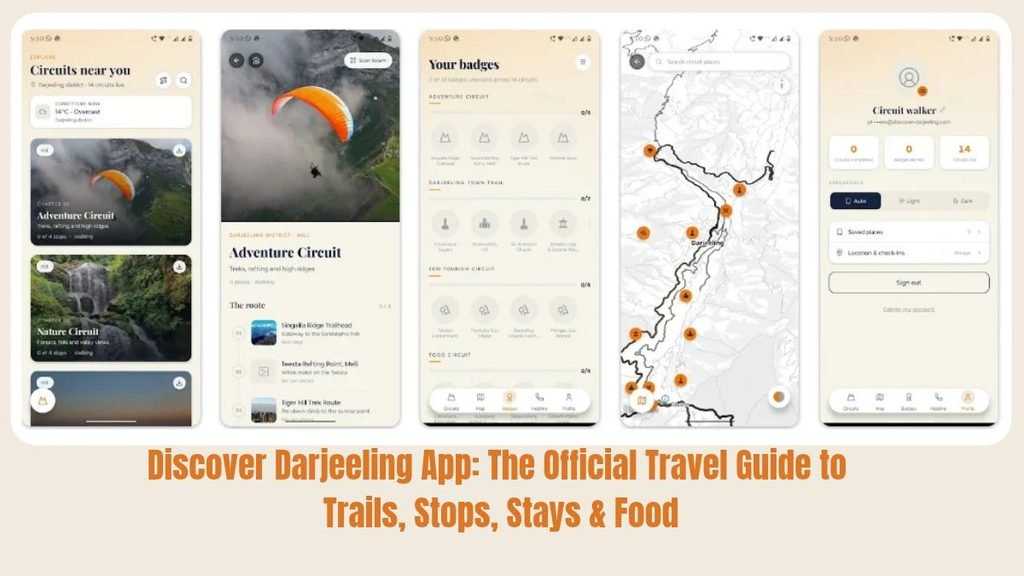
Planning a trip to Darjeeling? The Discover Darjeeling app is the official mobile travel guide for Darjeeling district, built by the District Administration Darjeeling. It puts ready-made trails, stop-by-stop information, maps, and places to eat and stay in one app on your phone.
In this guide, we explain what the app is, what it offers, how to download it and how to use it on your trip.
Quick summary
- App name: Discover Darjeeling
- Offered by: District Administration Darjeeling
- Platform: Android 7.0 and above (Google Play)
- Version: 1.0.0 (released 5 October 2026, last updated 25 October 2026)
- Age rating: 3+
- Download: Google Play Store
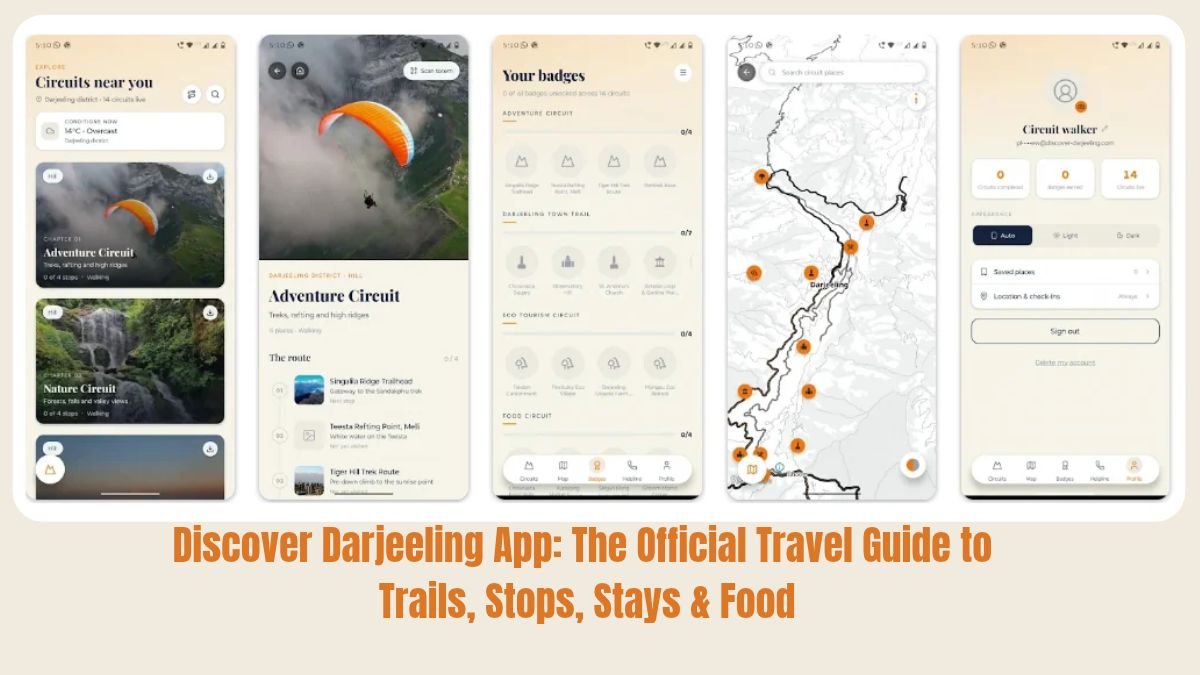
What Is the Discover Darjeeling App?
Discover Darjeeling is a tourist guide app that organises the whole district into themed circuits. A circuit is a sequence of stops that you can follow at your own pace. The circuits cover:
- Heritage
- Tea and culture
- Nature
- Wildlife
- Adventure
- Food
- Eco-tourism
Every stop in the app carries its history, a short hook that tells you why it is worth visiting, and the practical details that decide a day out: timings, entry fees, parking, toilets and accessibility.
The app also has a bigger aim. It wants to spread visitors beyond the few well-known viewpoints and help the administration see where people are actually going.
Why Is This App Useful for Tourists?
Many visitors to Darjeeling only see Tiger Hill, the Mall and a couple of famous spots. This app helps you plan a fuller, smoother trip.
- Official information. The content comes from the District Administration, not from random listings.
- Ready-made trails. You don’t have to build an itinerary from scratch. Follow a trail stop by stop.
- Practical details in one place. Check timings, entry fees, parking, toilets and accessibility before you leave your hotel.
- Works where the network doesn’t. You can download a circuit and use it offline, which matters in hill areas with weak signal.
- Find hidden corners. The app points you to lesser-known places across the district.
- Food and stay options nearby. Each stop shows places to eat and stay close by, with phone numbers.
- Private trip memories. Photos you add are saved to your own gallery and, according to the app, are never uploaded anywhere.
Key Features of the App
1. Themed circuits and trails
Pick a circuit that matches your interest. For example, the Darjeeling Town Trail is a walking trail of 7 places described as “Colonial hill station, monasteries & mountain views”.
2. Detailed stop pages
Each stop page has a photo, a category tag (such as Hill or Heritage), a history section and a Quick Facts box. For Chowrasta Square, for example, the quick facts show the elevation (about 2,134 m), best views (October–November mornings), that vehicles are not allowed, and nearby treks such as Tiger Hill (14 km).
3. Directions in Google Maps
Every stop and every trail has a Google Maps button, so you can get directions or open the full route in one tap.
4. Check-in and badges
When you arrive at a stop, tap Check in to unlock a badge. The trail screen tracks your progress (for example, 0 / 7 stops visited).
5. Eat Here and Stay Here
Stop pages list nearby restaurants, cafés and hotels with phone numbers, and show how far they are (many are under 1 km away). Government lodges are marked GOVT and listed first. Other places are ordered by Google rating. The app reminds you to confirm details with the place before you book or visit.
6. Your own photo record
Add photos at each stop to build your own trip record. They are saved to your phone gallery.
7. Offline circuits
Download a circuit before you go so it works in areas with no network.
8. Festivals and events
The latest update shows upcoming festivals and events on the home screen, and on a stop’s page when an event is held there.
9. Photo galleries
Swipe through more photos at the top of a stop’s page.
Example: The Darjeeling Town Trail
The Darjeeling Town Trail is a good first trail for new visitors. It has seven stops, and you can do it on foot:
- Chowrasta Square: the vehicle-free square on the ridge
- Observatory Hill: Mahakal Temple on the hill above Chowrasta
- St. Andrew’s Church: Darjeeling’s oldest church, founded in 1843
- Batasia Loop & Gorkha War Memorial: the toy train’s spiral loop and a war memorial
- Ghoom Monastery: Yiga Choeling, home of a 15-ft Maitreya Buddha
- Padmaja Naidu Himalayan Zoological Park & HMI: a high-altitude zoo on Birch Hill, with the Himalayan Mountaineering Institute next door
- Japanese Peace Pagoda: a 28.5 m white stupa on the Jalapahar slopes
How to Download the Discover Darjeeling App
- Open the Google Play Store on your Android phone.
- Search for “Discover Darjeeling” or open the direct link: https://play.google.com/store/apps/details?id=in.discoverdarjeeling.app
- Check that the app is offered by District Administration Darjeeling.
- Tap Install and wait for the download to finish.
- Open the app and start exploring.
Requirements: Android 7.0 or higher. The Play Store listing showed the app as compatible with the tester’s Motorola Edge 40 Neo.
How to Use the App: Step by Step
- Open the app and browse the circuits on the home screen.
- Choose a circuit or trail that suits your interest and time, such as the Darjeeling Town Trail.
- Download the circuit if you expect weak network on the way.
- Read the route. The trail page lists every stop in order with a short description.
- Tap a stop to read its history, timings, fees and Quick Facts.
- Tap “Directions in Google Maps” to get to the stop, or “Route in Google Maps” for the whole trail.
- Tap “Check in here” when you arrive to unlock your badge.
- Scroll down for Eat Here and Stay Here to find food and lodging nearby. Call the place to confirm details.
- Add your photos to keep a private record of your trip.
Tips for Getting the Most Out of the App
- Download your circuit at your hotel. Do it on Wi-Fi before heading to the hills.
- Check timings and entry fees on the stop page before you go.
- Call ahead. Phone numbers and details for restaurants and stays can change, so confirm before you visit.
- Plan around the weather. For example, the Chowrasta page lists October–November mornings as the best time for mountain views.
- Try a lesser-known stop. The app is designed to help you look beyond the famous viewpoints.
Frequently Asked Questions (FAQs)
What is the Discover Darjeeling app?
It is the official mobile travel guide for Darjeeling district, built by the District Administration. It offers themed circuits, stop details, maps, and places to eat and stay.
Is the Discover Darjeeling app official?
Yes. The Google Play listing shows it is offered by District Administration Darjeeling.
How do I download the Discover Darjeeling app?
Open the Google Play Store, search for “Discover Darjeeling”, and tap Install. You can also use the direct link: https://play.google.com/store/apps/details?id=in.discoverdarjeeling.app
Which phones does the app work on?
The Play Store listing says it needs Android 7.0 or higher. We did not find an iPhone version at the time of writing, so check the App Store or the official district channels for updates.
Can I use the app without internet?
Yes, partly. You can download a circuit and use it where there is no network. Features such as Google Maps directions will still need a connection.
What kind of information does each stop have?
History, a short hook, timings, entry fees, parking, toilets, accessibility, Quick Facts, photos, nearby places to eat and stay, and events when something is being held there.
What are circuits in the app?
Circuits are themed sequences of stops. The themes are heritage, tea and culture, nature, wildlife, adventure, food and eco-tourism.
What are badges and check-ins?
When you reach a stop, tap Check in to unlock a badge for that stop. It is a fun way to track your progress on a trail.
Are my photos uploaded anywhere?
According to the app, photos you add are saved to your gallery and never uploaded anywhere.
Can I find hotels and restaurants in the app?
Yes. Stop pages have Eat Here and Stay Here sections with phone numbers and distance. Government lodges are marked GOVT.
How are the hotels and restaurants ordered?
Government lodges come first. Other places are ordered by Google rating.
Is the app free?
Check the current price on the Google Play listing before installing, as pricing can change.
What is the app’s age rating?
It is rated 3+ on Google Play.
Who should use this app?
First-time visitors, families, photographers, heritage and nature lovers, trekkers, food lovers, and anyone who wants to explore Darjeeling beyond the usual viewpoints.
The Discover Darjeeling app is a handy, official companion for anyone visiting the district. With guided trails, practical stop details, offline circuits, directions and nearby food and stays, it takes much of the guesswork out of planning. Download it before your trip, pick a trail, and enjoy Darjeeling at your own pace.
Download now: Discover Darjeeling on Google Play